
Record
Do the task once in the browser; Robonans records the buttons you click and the fields you fill in as steps.
Enterprise process automation · RPA
Invoicing, Excel data entry, reporting and ERP operations eat up your team's hours every day. These repetitive tasks cost time and invite human error. With Robonans, we build a digital workforce inside your company.
Robonans in 37 seconds · real interface (in Turkish), sample data
The same screens, the same filters, the same copy-paste. Skilled teams spend much of their time moving data around.
A wrong exchange rate, a missing description, a skipped dispatch note. Manual work gets tired and makes mistakes.
Reports slip to the morning, invoices to the next day. The robot works at night; the results are on your desk by morning.
How it works
Do the task once in the browser; Robonans records the buttons you click and the fields you fill in as steps.
Steps appear as cards: “Go to page”, “Type in field”, “Click”, “Write to Excel”… No code; changing a step is as easy as changing a box.
Run it every morning, every night or on the first day of the month. Ask for your approval before steps that write data out, or let it follow its rule.
Reports, PDFs and record links land in “My inbox”; or in a single email, attachments included.
Product screens
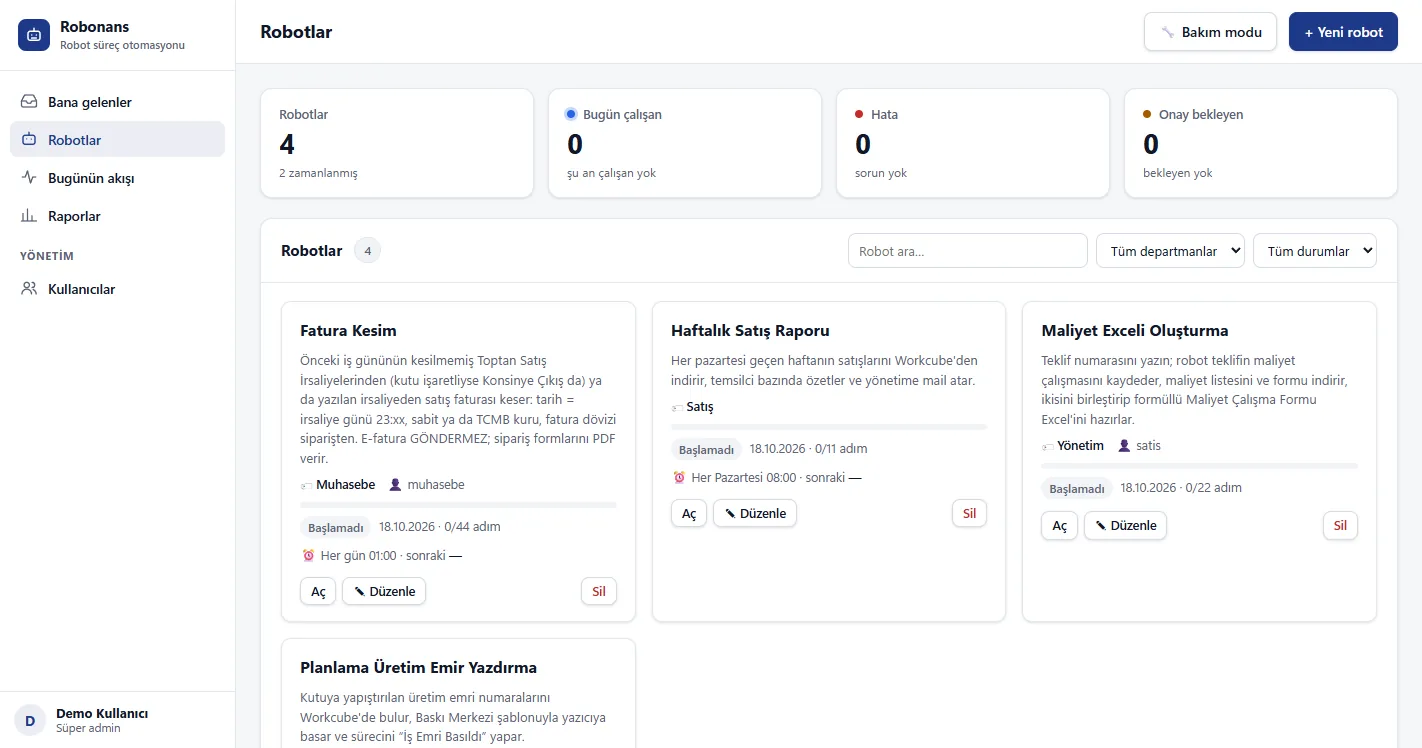
These are the product's real screens (Turkish interface); robots and records use sample data.
Features
Robots are made of visible steps. Anyone can read what a robot does; no waiting for a developer to change it.
Workcube login, reading reports and lists, filters, filling in forms, PDFs from the Print Center. The same approach works in other web-based systems.
Filter, group and total a downloaded report; fill in your Excel template with its formulas; update a PowerPoint deck.
With the “Repeat for each row” step, dozens of dispatch notes, orders or customers are processed in turn; a failing row is noted and the rest continue.
Before writing anything out, the robot shows a table; only the rows you tick are processed. The approval link also arrives by email.
Personalised or bulk email with attachments. Unapproved sends go only to internal addresses; empty reports are never sent.
Daily, weekly and monthly runs; clash warnings; a watchdog that restarts a closed app; nightly backups.
Watch what the robot is doing from your browser; the log records every step to the second.
User, admin, super admin. Everyone sees only the robots and reports they should see.
Example scenarios
Security and installation
Robonans is not a cloud service. It installs on your company's Windows server or virtual machine with a single setup script; robots connect to your ERP over your own network.
FAQ
Yes. Robots are made of visible steps; most tasks are built by recording and editing boxes. When a complex decision is needed (e.g. choosing an exchange rate), a small custom step is added and it shows on screen like the rest.
There are ready-made steps for Workcube. It also works with other browser-based ERPs and web apps, Excel, PowerPoint, Outlook/SMTP and Windows desktop applications.
The failing row or step is noted, the ERP's warning is written as-is to the log and the report, and the right people are notified. The same record is never processed twice.
On Windows 10/11 Pro or Windows Server, ideally on a separate virtual machine. The setup script installs the required components (database, web server, task scheduler) itself.
The product interface is currently in Turkish. Talk to us in the demo about the language your team needs.
Tell us about the task that takes you the most time; in the demo call we'll build that task's robot together.

We'd like to measure visits with Google Analytics cookies to improve the site. If you decline, no analytics cookies are used. Details