
Robotic process automation
What is RPA? No-code RPA for Workcube and ERPs
RPA (robotic process automation) means software robots that do repetitive, rule-based computer work by clicking and typing on screen, the way an employee does. Invoicing, collections reports, preparing work orders and sending open-order lists on a schedule are typical RPA tasks. It works without changing your ERP, Excel or email; the only thing that changes is that a person no longer has to do that work.
Which tasks are a good fit for RPA?
RPA pays off most on rule-based tasks done with the same steps every day or every week. These questions tell you whether a task suits RPA:
- Are the steps the same every time? (same screens, same fields, same report)
- Can the decisions be written as rules? (e.g. “use the order's fixed rate if there is one, otherwise the central bank rate”)
- Does the task move data between several systems? (e.g. ERP → Excel → email)
- Does the team spend hours a week on it, with the occasional mistake?
If most answers are “yes”, the task can be handed to an RPA robot. Tasks whose screens change often, or that need human judgement every time, are not a good place to start.
How does RPA work?
In Robonans an RPA robot goes live in four steps:
- Record. Do the task once in the browser; Robonans records the buttons you click and the fields you fill in as steps.
- Edit. Steps appear as cards: “Go to page”, “Type in field”, “Click”, “Write to Excel”… Changing a step is as easy as changing a box; no code is written.
- Schedule or approve. Run the robot every morning, every night or on the first day of the month. Have it ask for your approval before steps that create records in the ERP, or let it continue by the rule you set.
- Get the results. Reports, PDFs and record links land on the “My inbox” screen; or in a single email, attachments included.
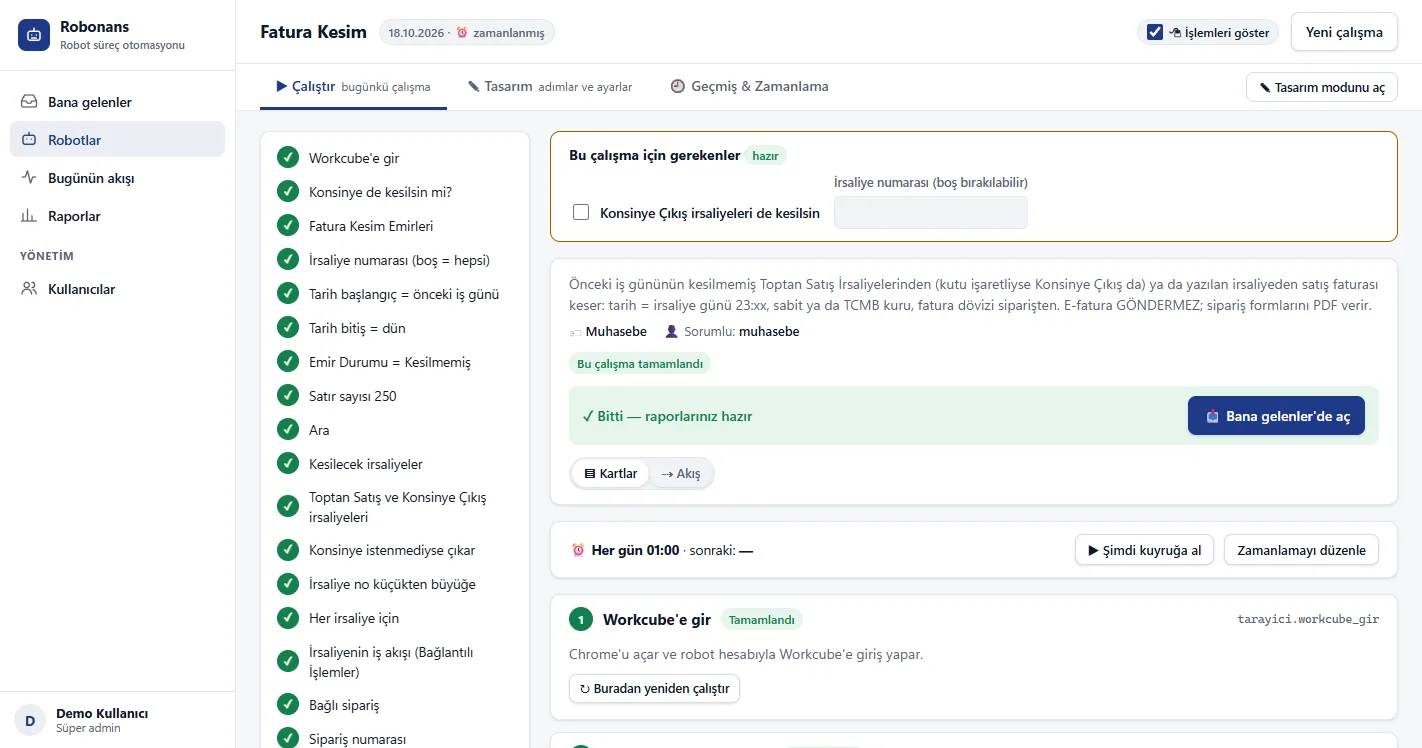
RPA examples: what gets automated in Workcube and ERPs?
Invoicing: from dispatch note to invoice, overnight
The robot lists the previous business day's uninvoiced dispatch notes. For each one it opens the order; it uses the order's fixed rate if there is one, otherwise the central bank's previous closing rate. It fills in the invoice date, currency and description by rule and saves. It does not send the e-invoice; the final check stays with you. In the morning, the order-form PDFs and a summary report arrive in one email.
Collections reports and customer notifications
It downloads the collections report from the ERP, applies the rules and shows the items to process in an approval table. It writes the ones you approve to the ERP and prepares a personalised email for each customer. External emails never go out without approval; the summary arrives in Excel for the finance team.
Preparing work orders
The robot lists the records to turn into work orders and, for each row, opens the work order form, fills in the required fields by rule and saves. A failing row is noted and the rest continue; the list of prepared work orders is emailed to the team.
Sending the open-order list on a schedule
On the day and time you choose, it runs the open-order report in the ERP, exports it to Excel, filters and groups it. It emails the list to managers, sales reps or each customer; if the list is empty, no empty report goes out.
RPA vs. API integration
Both automate work, in different ways. The right choice depends on the task and the system:
| By hand | API integration | RPA | |
|---|---|---|---|
| How it works | An employee clicks and types | Systems connect at the data level | A robot uses the same screen an employee uses |
| Going live | Immediately, but again every day | Needs software development; can take weeks | Show the task once, edit the steps |
| Needs an API | No | Yes, on both systems | No |
| Error risk | Fatigue and distraction | Low | Low; a failing row is noted, the rest continue |
| Best for | Rare, judgement-based tasks | High-volume, permanent data flows | Screens with no API; work moving between ERP, Excel and email |
In practice they are not rivals: APIs suit permanent, high-volume data flows, while RPA delivers faster results for the daily routine work done on screen.
RPA with Robonans: why on your own server?
- Data stays in the company. Robonans is not a cloud service; it installs on your Windows server or virtual machine with a single setup script and connects to your ERP over your own network.
- No unapproved writes. Steps that create records in the ERP are tied to an approval or an explicit safety rule.
- Every step is visible. Watch the robot live while it runs; the log records every step to the second.
- Encrypted passwords. ERP and email passwords are stored encrypted and never shown on screen again.
- Audit log and versions. Every settings change and robot version is logged; you can roll back to an earlier version.
RPA FAQ
Do you need a developer for RPA?
Not with Robonans. You do the task once in the browser and the robot records the steps; the steps appear as cards and are edited by changing boxes. When a complex decision is needed, a small custom step is added and it shows on screen like the rest.
Can RPA be used with Workcube?
Yes. Robonans has ready-made steps for Workcube: login, reading reports and lists, filters, filling in forms and getting PDFs from the Print Center. It works the same way in other browser-based ERPs and web apps.
Which systems does it work with?
There are ready-made steps for Workcube. It also works with other browser-based ERPs and web apps, Excel, PowerPoint, Outlook/SMTP and Windows desktop applications.
What happens if the robot hits an error?
The failing row or step is noted, the ERP's warning is written as-is to the log and the report, and the right people are notified. The same record is never processed twice.
Does RPA take our data outside the company?
Robonans is not a cloud service; it is installed on your company's Windows server or virtual machine and connects to your ERP over your own network. Your data stays in your company.
Where is it installed?
On Windows 10/11 Pro or Windows Server, ideally on a separate virtual machine. The setup script installs the required components (database, web server, task scheduler) itself.
Let's build your first RPA robot together
Tell us about the task that takes you the most time; in the demo call we'll build that task's robot together, in your ERP.
Request a demo